How to Create a Hyperlink to Any Task in the Application
Are you looking for a simple way to insert the tasks you are working on into your e-mails, so you don't have to write them all down?
You're in luck, because here you have the tool to create a hyperlink, or a link to any task in the application, so you can make a copy of the task, that will act as a link in the document and will open the task page in the application.
For anyone who wants to use it, there is a simple way to make this work:
1. Install the extension; it's completely free.
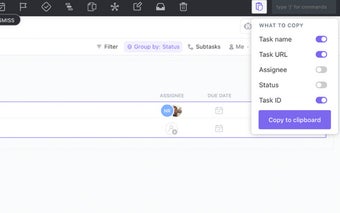
2. You'll be able to select the tasks you want to make hyperlinks.
3. Press the extension button.
4. There will be a hyperlink in your clipboard to make a copy of the selected task.
To make this work, you need to be in the application with the selected task selected in order to save a copy of it in the clipboard.